Lined Blank Notebook Templates: Your KDP Publishing Solution
Why Structured Interiors Matter More Than You Think
When you're building a notebook for Amazon KDP or any print-on-demand platform, the interior design often gets overlooked. Most creators focus heavily on the cover, assuming a beautiful exterior will carry the product. But experienced publishers know the truth: the interior is where customer satisfaction lives or dies. A poorly formatted notebook interior leads to returns, negative reviews, and wasted effort. That's exactly why having access to reliable Lined Blank Notebook Templates changes the game entirely.
These templates aren't just random line grids thrown onto a page. They represent a carefully considered approach to notebook interior design, built specifically for the realities of modern self-publishing. The lines are spaced to accommodate comfortable writing, the margins respect binding tolerances, and the overall layout feels professional without being sterile. There's a quiet confidence in well-designed notebook interiors that readers sense immediately, even if they can't articulate why one notebook feels better than another.
Understanding What You're Actually Getting
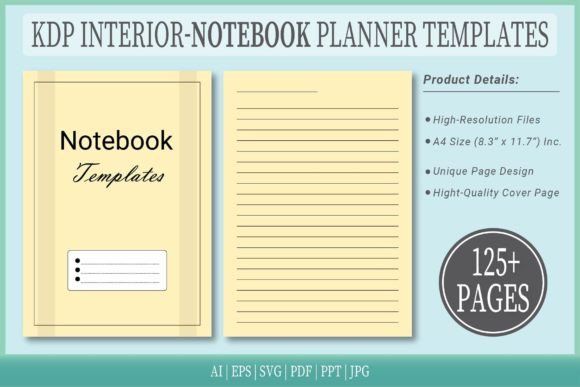
The download package for these Lined Blank Notebook Templates includes everything you need to move from concept to published product. You receive a PDF interior ready for direct upload to KDP, which eliminates formatting headaches that trip up so many first-time publishers. But the package goes further than that. Editable source files in vector AI and EPS formats give you complete creative control if you want to customize spacing, adjust margins, or modify the line style to match a specific brand aesthetic.
The A4 size at 8.3 by 11.7 inches with no bleed is a practical choice. It's a standard dimension that prints cleanly across multiple platforms, not just Amazon. The 125-page count hits a sweet spot for notebooks that feel substantial without becoming unwieldy. And having six format types available—AI, EPS, SVG, PDF, PPT, and JPG—means you're covered whether you're working in Adobe Illustrator, Canva, PowerPoint, or any other design environment.
What makes these templates particularly useful is the extra cover page included in the package. Most template bundles force you to source covers separately, creating visual inconsistency between exterior and interior. Having a coordinated starting point saves time and helps maintain a cohesive brand identity across your publishing catalog.
Where These Templates Fit Into Real Workflows
Designers and creative professionals will find these Lined Blank Notebook Templates useful beyond simple journal publishing. Think about brand collateral for clients who need custom notebooks as promotional items. A marketing agency could quickly produce branded notebooks for a product launch, complete with company colors applied through the editable source files. The vector formats make color adjustments straightforward without degrading line quality.
Entrepreneurs and small business owners often underestimate the power of physical products as brand touchpoints. A well-produced notebook with your logo on the cover and clean lined pages inside becomes a tangible extension of your brand identity. It sits on desks, travels to meetings, and generates conversations. The professional quality of these templates ensures that your branded notebook doesn't feel cheap or hastily assembled, which directly influences how people perceive your business.
Content creators and bloggers can use these templates to develop lead magnets or paid digital products. A downloadable PDF notebook with lined pages appeals to audiences who prefer handwriting over digital note-taking. The high-resolution interiors ensure that printed versions look crisp, while the PDF format works perfectly for digital distribution through your own website or platforms like Gumroad and Etsy.
Practical Considerations for Publishing Success
Before uploading to KDP, take time to review the interior against Amazon's current specifications. While these templates are designed to be 100% ready for upload, platform requirements occasionally shift. Open the PDF and verify that page dimensions match your chosen trim size. Check that text layers, if you add any, sit within safe margins away from the gutter and trim edges. This extra five minutes of verification prevents frustrating rejection notices.
Font pairing becomes relevant if you're adding title pages, chapter headers, or instructional text to the notebook interior. Choose typefaces that complement the clean simplicity of lined pages. A modern sans serif font works well for headers, maintaining the contemporary feel of the design. Avoid overly decorative display fonts on interior pages, as they compete with the functional purpose of the notebook. Save expressive typography for the cover, where it can make a stronger visual statement.
Think about your target audience when deciding how to customize these templates. A gratitude journal aimed at wellness-conscious adults might benefit from wider line spacing and a softer paper texture suggestion in your product description. A business notebook targeting professionals might use standard spacing and include subtle section dividers. The editable source files in AI and EPS formats make these adjustments possible without starting from scratch.
Building a Publishing Catalog With Consistency
One notebook rarely builds a sustainable publishing business. The real opportunity lies in creating a catalog of related products that cross-sell naturally. These Lined Blank Notebook Templates serve as a foundation. From this starting point, you can develop variations—dotted journals, graph paper notebooks, sketch-and-write hybrids—all maintaining the same professional quality and dimensional consistency. When customers discover one of your notebooks and look for complementary products, that visual and tactile consistency builds trust and encourages repeat purchases.
The multiple file formats included in this package support that expansion strategy. Use the SVG files for web-based previews on your author website. Pull the JPG versions for social media graphics promoting new releases. Open the PPT file to quickly mock up product presentations if you're pitching wholesale opportunities to local retailers or corporate gift buyers.
Professional design assets like these templates reduce the gap between independent publishers and established publishing houses. The quality speaks for itself in the finished product, and the flexibility of editable source files means you're never locked into a single aesthetic direction. Whether you're launching your first notebook or your fiftieth, starting with a solid template foundation accelerates production while maintaining the quality standards that generate positive reviews and loyal customers.