Create a Personalized Guess Who Game in Minutes
The classic Guess Who game holds a special place in many of our childhoods, but the original characters are generic. For a truly memorable game night, a team-building exercise, or a unique gift, a custom version is far more engaging. The challenge has always been the design work involved. That's where the Guessing Game Board Canva Templates come in, offering a straightforward solution for creating a professional-looking, personalized game without needing advanced design skills.
An Overview of the Guessing Game Board Canva Templates
At its core, this product is a set of digital templates designed to work seamlessly with a free Canva account. It's not a physical game but the blueprint to make your own. The package includes a PDF with direct links to the Canva templates. Once you open the link, you'll find a clean, pre-formatted layout ready for your content. The design style is intentionally neutral and functional, providing a solid foundation that lets your chosen photos and themes take center stage.
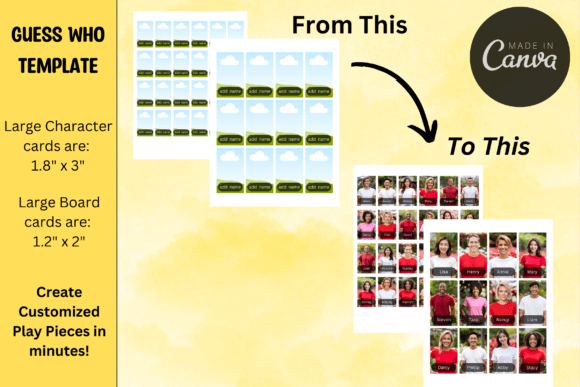
The system is built around two main components. First are the large character cards, sized at 1.8" x 3", which are the main game board pieces players flip up and down. Second are the smaller board cards at 1.2" x 2", which each player holds to mark their guesses. This dual-template approach ensures all game components are perfectly scaled and consistent. A particularly useful feature is the inclusion of two template versions: one with name tags and one without. This flexibility allows you to create a straightforward visual guessing game or add an extra layer of identification, making it perfect for diverse projects like family reunions or corporate onboarding.
Practical Applications for Creative Projects
The true value of these Guessing Game Board Canva Templates lies in their versatility. They function as a creative toolkit for a wide range of users. For marketers and small business owners, this is a clever branding asset. Imagine a trade show booth where visitors play a "Guess the Team Member" game, or a client appreciation gift featuring industry influencers. It transforms passive marketing into an interactive brand experience. The design's simplicity ensures it won't clash with your existing brand identity, acting more like a neutral container for your content.
Content creators and bloggers can leverage these templates to build community engagement. A "Guess the Guest" game for an upcoming podcast episode or a "Guess the Recipe" challenge for a food blog adds a layer of interactive fun that static posts cannot match. The process is designed for efficiency: drop in your pictures, save the file, print, and cut. This streamlined workflow respects the time constraints of busy professionals. The practical note about potential trimming based on printer settings is a helpful heads-up, reminding users that a quick test print can save paper and ensure the final pieces fit their game board perfectly.
Design Considerations and Workflow
Working within Canva, you'll find the templates easy to manipulate. The layout is structured, which is excellent for maintaining alignment and consistency across all cards. This is a key aspect of modern typography and design systems—creating a cohesive set where every element feels intentionally placed. While the template itself isn't a premium font or a complex typeface, its strength is in its structured grid, which supports visual hierarchy. Your photos become the primary visual element, and the optional name tags serve as a supporting textual layer.
When selecting your photos, aim for consistency. Similar lighting, framing, and background will make the game more visually cohesive and slightly more challenging. Think of it like designing a set of playing cards or a brand's social media graphics; consistency in the source material elevates the final product. For those using the name tag feature, choose a clean, legible sans serif font available in Canva to ensure readability at the small print size. This attention to detail is what separates a homemade project from a polished design asset.
The end result is more than just a game; it's a piece of personalized editorial design. It tells a story through the faces you choose, whether it's the story of your family, your company's culture, or your blog's community. By handling the technical layout and sizing, the Guessing Game Board Canva Templates free you to focus on the creative and strategic aspects—the very elements that will make your custom Guess Who game memorable and effective. It’s a practical tool that turns a fun idea into a tangible reality with minimal friction.